





Practical AI with Finch Robots
Whether you attended the Practical AI with Finch Robots workshop at CSPD Week 2026 and want a refresher on the key concepts, or you received a Finch Robot and couldn’t make the session, this recap highlights the main ideas, activities, and classroom applications explored during the workshop.
Artificial intelligence is one of the most talked-about topics in education today, but it can often feel complex or abstract. During this hands-on workshop, educators explored AI through engaging activities using:
Rather than simply discussing how AI works, participants experienced the machine learning process firsthand by building models, testing predictions, and connecting AI to physical computing projects.

Here’s a look at the key ideas and activities from the workshop
Bonus Resource: Download the Workshop Slides
Looking for the complete presentation?
Todd’s Practical AI with Finch Robots workshop slides for additional examples, activity details and resources shared during CSPD Week 2026.Starting with the Fundamentals
We began with a brief introduction to CreXo and BirdBrain Technologies, organizations committed to creating engaging STEM and computer science learning experiences for students.
Participants were introduced to the Finch Robot 2.0, a versatile educational robot designed to support coding and computational thinking from elementary school through college.
Before diving into AI, attendees learned the basics of connecting, programming and controlling a Finch Robot using FinchBlox and MakeCode. This foundation ensured everyone was comfortable with the hardware and coding environment before adding machine learning into the mix.
Demystifying Artificial Intelligence
One of the most important parts of the workshop was developing a shared understanding of AI and machine learning.
We explored artificial intelligence as a broad category of technologies that enable computers and machines to make decisions, while machine learning represents a specific subset of AI that uses data to create predictive models. Participants discussed familiar examples including recommendation systems, translation tools, image recognition, and large language models such as ChatGPT, Claude, and Gemini.
We also discussed an important reality often overlooked in AI conversations: humans remain essential. People still train models, craft prompts, evaluate results, make decisions and ensure outputs are appropriate and accurate. This led to conversations about why computational thinking and AI literacy are becoming increasingly important skills for students.
Image Recognition with Finch

The first hands-on AI challenge focused on image recognition using Google Teachable Machine and Finch Robots. Participants trained their own machine learning models to recognize different bird images and then connected those models to pre-built Finch programs in Snap!.
This activity gave educators a practical understanding of how an AI model is created, tested, and integrated with a real-world physical computing project.
Machine Learning Workflow
Collect Training Data
Gather multiple bird images to create a quality training dataset.
Train the Model
Use Google Teachable Machine to build a machine learning model.
Test Accuracy
Verify predictions and improve the model using better training data.
Export the Model
Export the trained model for integration into classroom projects.
Connect to Finch Robot
Use AI predictions to control a physical Finch Robot.
Key Learning Outcome
As educators experimented with their models, they quickly discovered that the quality and quantity of training data directly affected prediction accuracy. This naturally led to discussions about bias, accuracy, and the probabilistic nature of machine learning systems.
Building a Magic Wand
Behind the Experience
The second challenge demonstrated the power of gesture recognition and embodied AI.
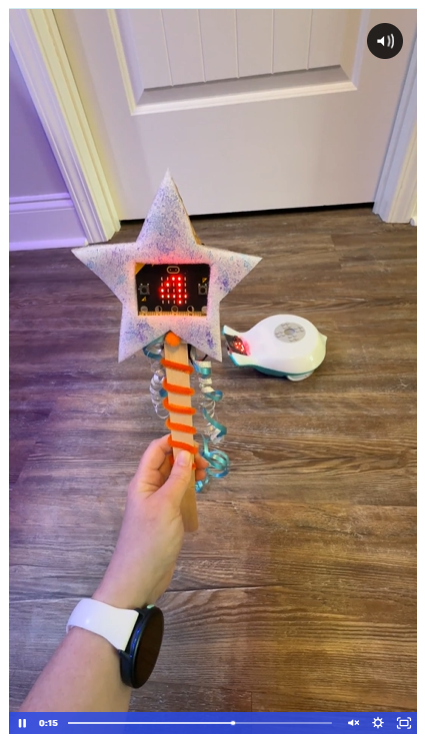
Participants worked in teams to build magic wands using micro:bits and the CreateAI platform. They trained custom machine learning models to recognize gestures and then used those gestures to wirelessly control Finch Robots through radio communication.
With a wave of a wand, robots could move, change colors, or perform programmed behaviors. The activity provided a practical demonstration of how machine learning can interpret sensor data and transform human movement into meaningful actions.
Participants also explored how AI can support creative, project-based learning that combines computer science, engineering, and design thinking.
Teaching AI Through Making
Throughout the workshop, educators explored free classroom resources from BirdBrain Technologies, including Finch Robots, Hummingbird Kits, Snap!, Python, MakeCode, Google Teachable Machine, and CreateAI.
Computational Thinking
Authentic coding experiences.
Machine Learning
Data quality & model training.
Create with AI
Build AI-powered student projects.
Looking Ahead
AI is rapidly becoming part of everyday life, and educators are searching for meaningful ways to introduce these concepts in the classroom. Hands-on robotics provides an ideal entry point because it makes abstract ideas visible, tangible, and engaging.
By combining machine learning tools with Finch robots and micro:bits, educators can give students opportunities to explore image recognition, gesture control, data collection, model training, and computational thinking in ways that are both accessible and exciting.
The excitement and creativity displayed during the workshop reinforced a simple truth: when students — and educators — can see AI controlling a robot they programmed themselves, artificial intelligence stops being something they merely hear about and becomes something they truly understand.
Free AI Teaching Resources
For educators interested in exploring these activities, BirdBrain Technologies provides free AI lessons and resources at birdbrain.info/AILessons.
Continue Exploring AI with Finch
Want the complete workshop presentation? Download Todd’s slide deck for additional examples, discussion prompts, and links to classroom resources.
Download Todd’s Slide Deck